
Most of us already know: modern building automation is, in large part, managed by Building Automation Systems (BAS), which orchestrate functions ranging from environmental control to security protocols. But here’s the thing: different BAS solutions use very different ways to communicate and move data.
And while they all use BACnet protocol at some point, the way they do make getting a clear picture of your network a bit tricky!
We get a lot of questions about that: will OptigoVN work with Niagara 4? Will it work with Desigo? Metasys? The list is pretty long, but the answer is thankfully short: Yes! OptigoVN can effectively work with all types of BAS software, ensuring that comprehensive insights are available no matter of the underlying system.
Let’s dive into the two main BAS types and see how OptigoVN helps you understand what’s going on with each one.
The BACnet-Centric Architecture
The first set we like to call “BACnet-first” solutions. These are the BAS systems that communicate entirely through the BACnet protocol, by default, from the server right through to the end points (controllers, hardware devices, etc.). OptigoVN works with these systems right out of the box, meaning Optigo Capture Tools (OCT) can be installed on the central server, and will capture all BACnet traffic going in and out of that device.
It’s as close to plug-and-play as you can have.
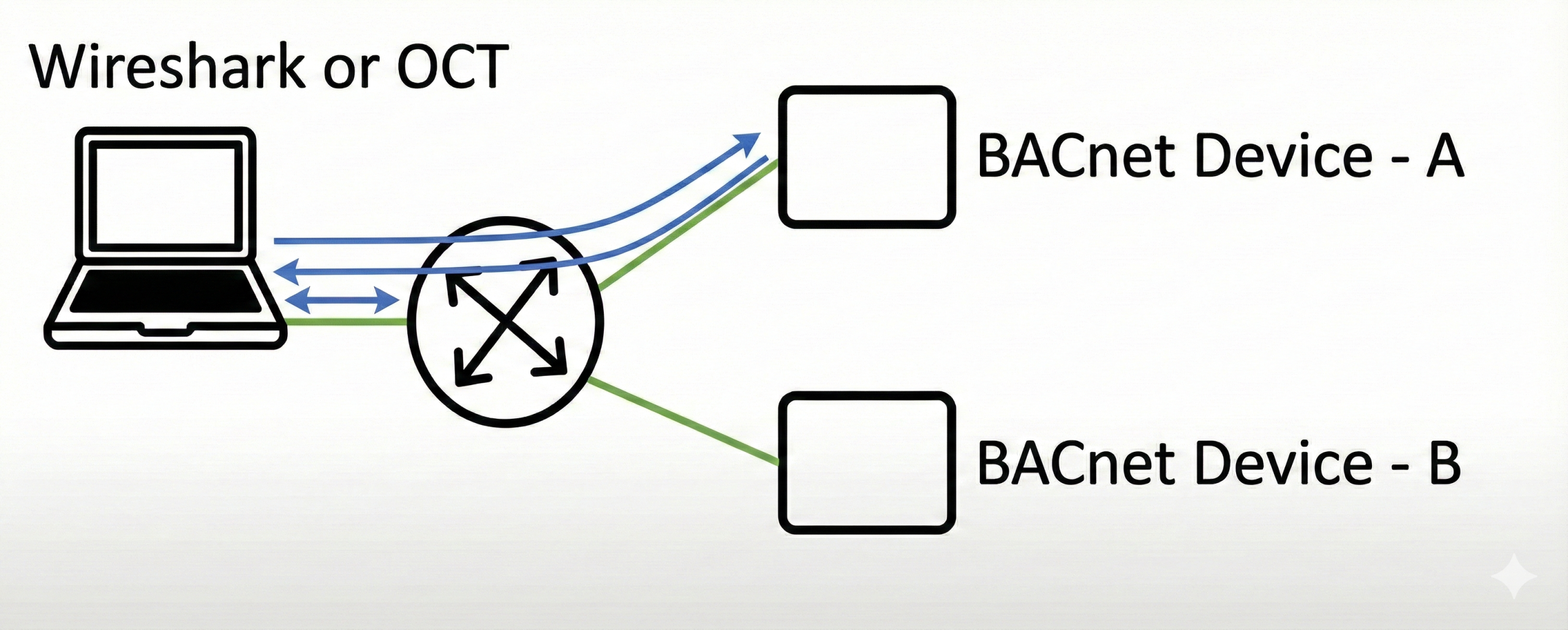
BACnet-centric BAS have several features that make them a breeze to work with:
- Interoperability: Using BACnet allows for the seamless communication among devices from various manufacturers.
- Transparent Data Access: Information flow is inherently transparent and readily accessible throughout the network infrastructure (note: it’s also unencrypted!).
- Integrated Network Operations: These systems typically function as one cohesive BACnet network, making extensive data sharing painless.
Popular BACnet-centric systems include:
- Delta Entelliweb
- ALC WebCTRL
- Alerton (Honeywell) Compass (1&2)
- Honeywell EBI (Point Servers)
- Siemens Desigo CC
- Siemens Insight Hub
For these systems, the deployment of OptigoVN is straightforward. The Optigo Capture Tool (OCT) can be installed directly on the primary BAS server. Since all* BACnet communications, including critical broadcast messages, travel through this server; the OCT can passively monitor all network traffic. This passive operation (it adds no processing overhead to the system) ensures no impact on BAS functions.
*Direct communications between devices wouldn’t be seen/captured in this scenario since it didn’t pass through the BAS. There are also rare exceptions for MS/TP subnets.
What about mixed BACnet/IP and MS/TP environments?
This is a slightly more complicated design: the network on the whole uses a modern BACnet/IP (or Ethernet) backbone with some MS/TP subnets that have been integrated. In these environments the central server still effectively captures BACnet traffic, but MS/TP traffic typically remains localized within its subnet. While the messages are typically forwarded to the larger IP network via a BACnet Broadcast Management Device (BBMD), any packets between MS/TP devices themselves will not be captured.
These devices can’t run software like our capture tool, but there’s still a solution if you want to directly capture traffic inside that MS/TP subnet: the OCT hardware version that can be attached via serial cable (RS-485), and will capture all the BACnet traffic along that MS/TP subnet.
So while you may have to go directly to the source to packet capture MS/TP traffic on subnets, comprehensive monitoring of an MS/TP is not only possible, but simple and easy with Optigo Networks.
The Engine-based Architecture
The second category is what are referred to as “engine” controllers in a web services protocol. In this arrangement, the central server communicates with an initial tier of intelligent controllers (referred to as engines, automation servers, or most commonly as JACEs) via a proprietary, often encrypted, web services protocol. BACnet communication with devices happens only after this initial layer of controllers.
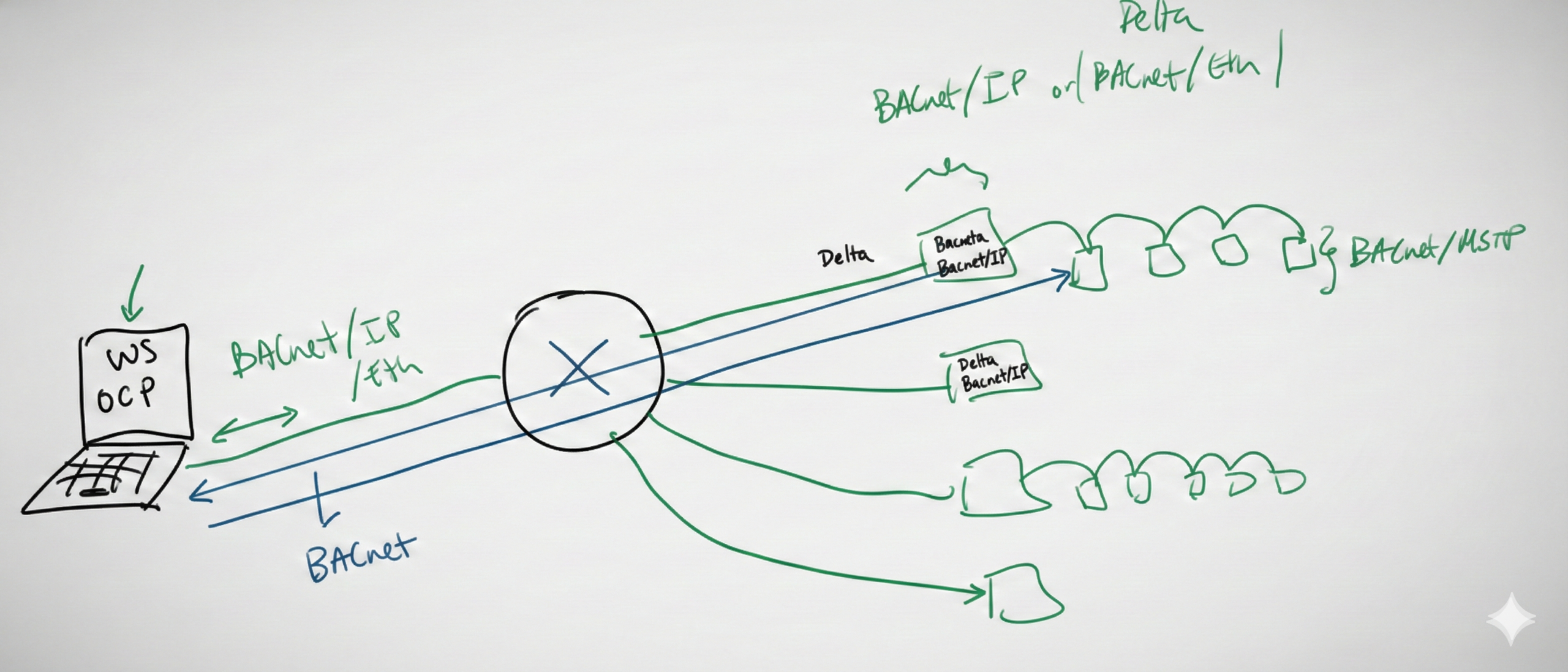
Characteristics:
- Efficient data-handling design: These configurations frequently consist of many small interconnected BACnet systems, each managed by its respective engine or JACE that can handle much of the data pre-processing, easing overhead on the entire system.
- Layered communication: A web services layer serves as an intermediary between the central server and the primary controllers. It acts as a secure, standardized buffer that prevents central servers from overwhelming or exposing sensitive controllers by translating complex traffic into simple, web-friendly language.
- Restricted direct access: Because of the proprietary nature of the initial communication layer, direct data access from the central server can be impeded or denied.
Popular systems include:
- Johnson Controls (JCI) Metasys
- Schneider Electric EcoStruxure (EBO)
- Tridium Niagara (4.x, 3(ax), 2) and white-labels:
- ABB Cylon HVAC Building Automation
- Reliable Controls
Because of the web services layer, installing the capture tool on a central server won’t capture BACnet traffic; because the server isn’t talking directly to the OT devices—and it’s not speaking BACnet. To run diagnostics with OptigoVN in these cases, you’ll need a more targeted approach. That means capturing traffic at the subnet level.
Capturing all BACnet traffic across the network might not always be realistic, but OptigoVN gives you several strategic ways to get the visibility you need, depending on your setup:
- Optigo Networks’ hardware capture tool. If you’re on-site, this is the easiest option. Like with MS/TP networks, you can use our physical capture tool to plug directly into the MS/TP trunk and capture all traffic on that daisy chain.
- BACnet routing. Many first-tier controllers (like JACEs ) support their own BACnet routing feature. BACnet traffic passthrough is enabled, making it possible for an upstream capture tool to pick it up. Just keep in mind that this setting is usually turned off by default, and you may need IT to step in and enable it.
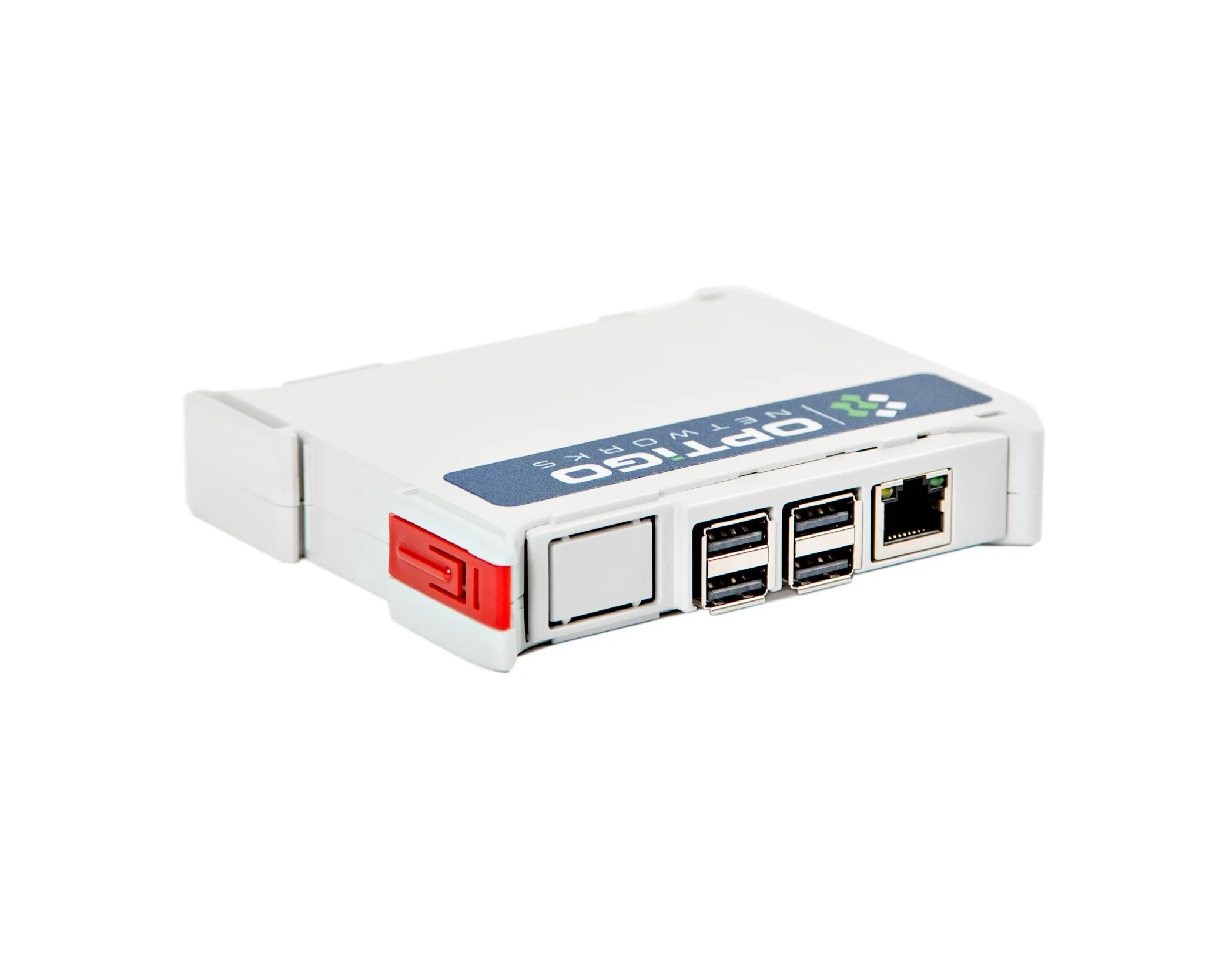
- Diagnostic switches. Less common today, but users running a hub on a BACnet/IP network can install a diagnostic switch (like this one we recommend from Contemporary Controls), which will allow a technician to then connect via a laptop running OCT and capture the BACnet traffic along that subnet.
- Built-in network capture. Some advanced controllers*—like certain Schneider and Loytec routers—have built-in capture tools. These can output PCAP files that can be uploaded straight into OptigoVN. For example, Ecostruxure Building Operation (EBO) can now be configured to pass packet captures into OptigoVN.
- Port mirroring. This is a network-level method where IT duplicates traffic from one port to another. You can then capture that traffic using a tool like the OCT. It’s effective, but it’s usually handled by IT and can raise security concerns since it involves copying all traffic.
- Wiretap (for Niagara JACEs). For sites using Tridium Niagara JACEs, the built-in Wiretap feature is a great option. It lets you redirect specific BACnet traffic to another device, like an OCT, for capture.
*Optigo Networks is working with several manufacturers to adopt similar traffic capture features on future controller models!
Get Clear Network Visibility—No Matter Your Setup
Whether your building uses a “BACnet First” or a “Web Services” architecture, OptigoVN is built to help you get the insights you need. We work closely with facility teams and system integrators to find the best way to capture and analyze BACnet traffic. As building networks get more complex, OptigoVN makes sure you’re not left in the dark.
Want to see what OptigoVN can do for your building? See how we can help improve your network’s performance and visibility.

OptigoVN Compatibility & BAS Network FAQ
- Is OptigoVN compatible with all Building Automation Systems (BAS)? Yes, OptigoVN is a brand-agnostic diagnostic platform compatible with all major BAS manufacturers, including Johnson Controls (Metasys), Schneider Electric (EcoStruxure), Tridium (Niagara), ALC (WebCTRL), and Siemens (Desigo). It provides network visibility regardless of whether the architecture is BACnet-centric or engine-based.
- How does OptigoVN capture data in a BACnet-centric architecture? In “BACnet-first” systems like Delta Entelliweb or ALC WebCTRL, the Optigo Capture Tool (OCT) is installed directly on the primary BAS server. Because these systems communicate via BACnet/IP from the server to the field devices, the OCT can passively monitor all global network traffic from a single point.
- How do you monitor Engine-based architectures like Tridium Niagara or JCI Metasys? In engine-based systems, a web services layer uses proprietary protocols between the server and the JACE/Engine. To analyze these, OptigoVN captures traffic at the subnet level (below the web services layer) where the actual BACnet communication occurs, using either hardware tools or software routing.
- What is the best way to capture BACnet MS/TP traffic? For MS/TP (RS-485) subnets, Optigo Networks provides a hardware version of the Optigo Capture Tool. This device connects directly to the twisted-pair serial trunk, converting local serial traffic into a format that OptigoVN can analyze for packet loss, token passing issues, and congestion.
- Does OptigoVN support Tridium Niagara Wiretap? Yes. For integrators using Tridium Niagara JACEs, OptigoVN supports data ingestion via the Wiretap feature. This allows users to redirect BACnet traffic to an OCT without needing additional hardware or physical site visits.
- Can OptigoVN analyze third-party PCAP files? Yes. OptigoVN can ingest PCAP files generated by third-party hardware, such as Loytec or Schneider Electric routers with built-in capture capabilities. This allows for seamless diagnostics without changing the existing network physical infrastructure.
- Will the Optigo Capture Tool (OCT) impact BAS network performance? No. The OCT is a passive monitoring tool. It does not inject traffic or consume significant CPU resources, ensuring that critical building control functions—such as life safety and HVAC setpoints—remain unaffected during the diagnostic process.
- How do you capture BACnet traffic across a VLAN or separate subnets? To capture traffic across different subnets, OptigoVN utilizes BACnet Routing, BBMDs (BACnet Broadcast Management Devices), or Port Mirroring (SPAN ports) on managed IT switches to ensure broadcast messages and global traffic are visible to the capture tool.