
The developers at Optigo Networks have been hard at work, adding exciting new features to Visual BACnet. Read about the latest updates to version 1.9.9!
The developers at Optigo Networks have been hard at work, adding exciting new features to Visual BACnet. Here are just a few of the latest updates to version 1.9.9, released on October 10th:
- Site sharing
- Visualization for BACnet Browser
- Tool tip on BACnet Browser
Site sharing
You can already share files by email — now you can share sites as well! Simply go into a site you’ve already created, or make a new one in Visual BACnet.
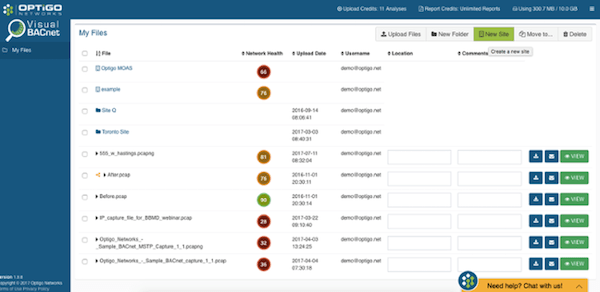

Click the share button in the top right, and add the emails of those with whom you’d like to share the site — just like you would when sharing a file by email. Note that only corporate email addresses (e.g. “@optigo.net”) are accepted. Your contact will receive an email linking them to the site. Once they log into or create an account with Visual BACnet, they’ll be able to access the site. Contributors that you add will be able to delete files, add or remove site collaborators, and upload files.
Visualization for BACnet Browser
The BACnet Browser in Visual BACnet provides important information on which source devices are causing spikes in network activity. Before, though, this detailed information was presented as a list, which could be hard to digest. You might have one source device sending out 10,000 packets per second — but what does that mean? What’s the context? How does that compare to other source devices?

We’ve taken that exact same data and created a histogram for easier, more visual analysis.
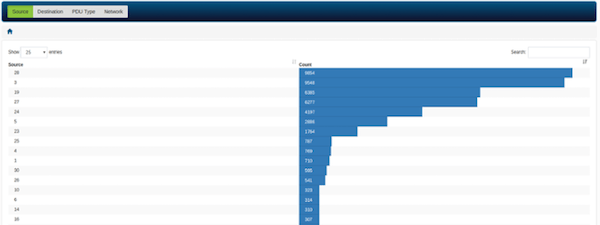
The histogram shows clearly where devices are clogging up the network. This helps you quickly pinpoint pesky source devices. Spot the problem, find the devices, and check their configurations to fix them!
Tool tip on BACnet Browser
To help you quickly and easily spot problem devices, we’ve added a tool tip to our BACnet Browser. The less you have to cross reference device lists and documentation, the better. Hover over any device to get more information on Vendor Name, Device ID, IP Address, and MAC Address.