

Finding the fault is the *easy* part of BACnet troubleshooting. The harder part is what comes after: deciding what matters, who owns each fix, and knowing if the work is done (right). A diagnostic report that nobody acts on is only a record of problems you already have.
How Do You Turn Diagnostic Results into an Action List?
1. Start with Impact
Work through errors before warnings and warnings before messages, then separate findings that are actively degrading performance from latent ones you can schedule. A finding that is knocking devices offline today belongs above one that adds modest overhead.
2. Group Findings by Root Cause
Several findings often share one source. An overloaded BACnet router can look like a failed segment, so group findings by the device or configuration behind them.
3. Give Every Item an Owner
In a typical organization, your in-house team takes what is within its training and authority, often physical checks. Your controls vendor or system integrator takes device configuration, programming, and anything under warranty or a service contract. Your IT team takes the switches, VLANs, and firewalls your BACnet/IP traffic rides on.
4. Document Each Item So It Can’t Be Misread
Include the device (instance number, address, network number, and location), the finding and severity as OptigoVN reported it, the capture date, what “fixed” looks like, and how you will verify it.
What Should You Tell Your Team vs. Your Vendor?
Your Internal Team
Your team needs context more than evidence: what the finding means in operational terms, why it matters now, and what to do if a fix falls outside their scope.
For example: “The third-floor supervisory controller is polling its devices too often, which is slowing that network. The controls vendor is adjusting it. Until then, please flag comfort complaints from that floor.”
Your Vendor or System Integrator
Your vendor needs evidence and acceptance criteria. Lead with the device and finding, attach the OptigoVN network health report, and state up front how you will judge the fix. Ask for a written root cause and a completion date, not only a quote, and ask for the configuration fix before you discuss new hardware.
For example: “Last Tuesday’s capture shows a duplicate device instance between two controllers on network 20, both under your service contract (report attached). Please confirm the cause, correct the configuration, and send a completion date. We will close this when a one-hour follow-up capture shows the finding cleared and nothing new on that network.”
What to Watch Out For
- Finger-pointing. On a network shared by several contractors, a fault can bounce between them: the controls vendor blames the network, IT blames the controllers, and the router manufacturer blames the field devices. Device-level findings shorten that conversation because the report names the device.
- Duplicate BBMDs. This. When several vendors each install their own BBMD without coordinating, broadcast traffic can double or worse, and enough of it can take a network down. If diagnostics flag one, have every vendor on that network confirm what they installed before anyone changes a Broadcast Distribution Table.
- “Fixed” without proof. A closed ticket is not a fixed network. Run a follow-up capture under comparable conditions and confirm the finding cleared without creating new findings elsewhere.
- More access than the job needs. Vendors need the data, not necessarily standing access to your network. Give integrators only the minimum access their tasks require, logging remote access, and preferring on-demand connections over persistent ones. NIST SP 800-82 Rev. 3, the U.S. government’s guide to OT security, covers access control in more depth.
- No plan for the next outage. Agree on roles with your vendors before something breaks. Our guide to collaborative OT crisis response covers how to set that up.
Not the Resident BACnet Expert? Start with the Optigo Assistant
Most organizations concentrate BACnet expertise in one or two people who are already at capacity. Findings nobody can interpret do not wait in a queue. They get dropped, and the problem tends to resurface months later as a more expensive emergency.
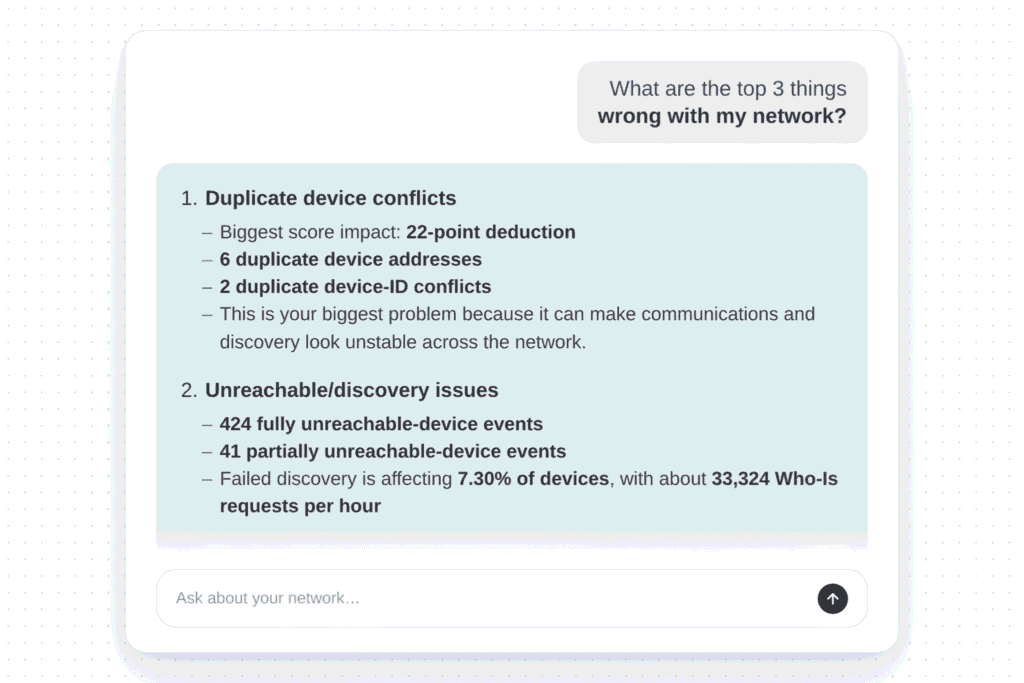
The Assistant is built into OptigoVN, and it works from your diagnostic results. OptigoVN runs the diagnostics and identifies the device. The Assistant answers plain-language questions about those results, explains the likely root cause, recommends fixes from Optigo’s documented resolutions, and drafts punch lists, reports, and client emails. It was trained on Optigo’s own troubleshooting material rather than the open web. As Ping Yao, Optigo’s co-founder and CTO, put it: “A general-purpose model has read a lot about BACnet. But it’s never watched a duplicate address distort the traffic you were using to find it.”
Two Prompts to Try First
From our list of nine questions to ask the Assistant:
- “What should I work on first?” The Assistant returns a prioritized order of findings and the reasoning behind it. That is the first draft of your action list.
- “Did my fix actually work?” Once OptigoVN has run diagnostics on a follow-up capture, the Assistant compares the results with earlier ones and tells you whether the finding cleared, how your health score moved, and whether anything new appeared.
Pick the building you have been meaning to look at. Upload one capture, ask the Assistant what to fix first, and walk into your next vendor meeting with the punch list already written. Start your free 7-day trial.
Why do duplicate BBMDs show up in BACnet troubleshooting?
When several vendors each install their own BBMD on the same network without coordinating, broadcast traffic can double or worse, and enough of it can take a network down. If diagnostics flag a duplicate, have every vendor on that network confirm what they installed before anyone changes a Broadcast Distribution Table. For more on what a BBMD does, see our BBMD guide.
How do you confirm a fix will hold?
Run a follow-up capture under comparable conditions, with at least one hour of BACnet/IP traffic and at least 15 minutes on each MS/TP network, and confirm the finding cleared without creating new ones. Service visits and configuration changes can undo a fix later, so scheduled or continuous captures show whether it is still holding weeks from now.
How do you decide who owns each fix?
Start with the device the finding points to. OptigoVN resolves findings to the individual device on both BACnet/IP and MS/TP. Physical MS/TP checks often fall to your in-house team. Device configuration and programming usually go to your controls vendor or system integrator. Problems with the switches, VLANs, or firewalls that carry your BACnet/IP traffic go to IT.


