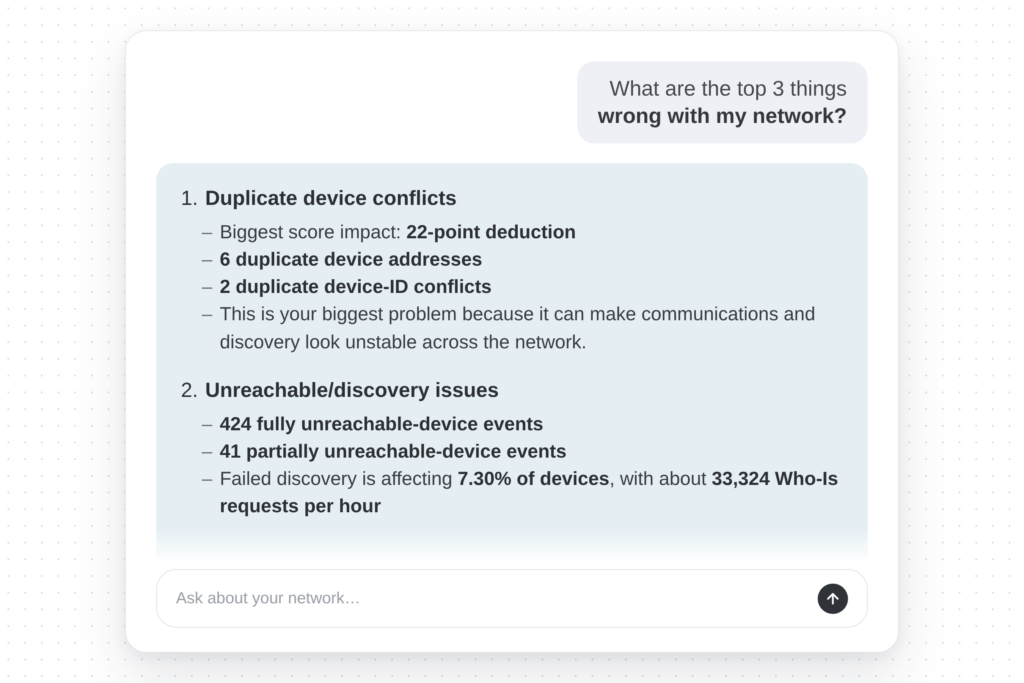
The OptigoVN Assistant is purpose-built to make sense of BACnet diagnostics. OptigoVN already resolves findings down to individual devices — not just that something is failing, but which device is causing it, which nothing else in this space does. The Assistant is what turns those results into something anyone on your team can act on.
The senior tech who has read captures for fifteen years gets there faster. The junior tech, the account manager, and the executive approving the budget get there at all. Ask it what is wrong and it answers in plain language, with the reasoning and the next step. Then it writes the punch list, the client report, or the email to your integrator.
We pulled back the curtain on all of that in the first post in this series — what the Assistant is for, and why we built it the way we did.
This one is the practical side. Below are nine things worth trying, picked because each returns something anyone on the team can understand and act on, whether or not they can read a capture.
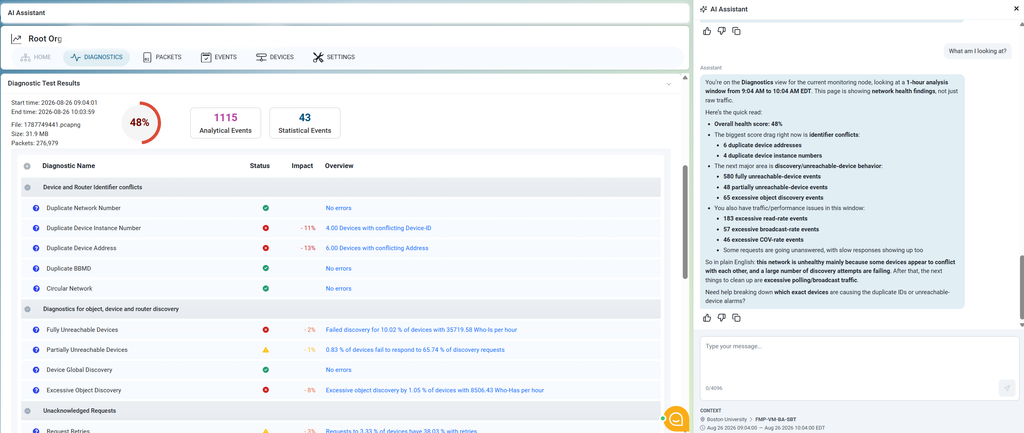
1. “What am I looking at?”
The first thing most people ask, and the one that used to require someone fluent in BACnet standing behind you.
You ask: What am I looking at?
It comes back with: a plain-language read of your Network Health Score, what is dragging it down, and which findings are worth your attention before the others. Not a list of error codes — an explanation of what the capture found and what it means for this building.
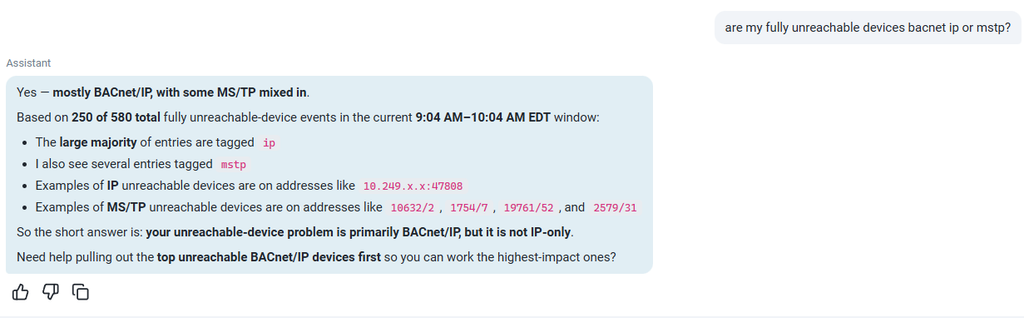
2. “Is this a BACnet/IP problem or an MS/TP problem?”
The question that determines who gets dispatched and with what equipment. A BACnet/IP fault is usually a network or configuration issue. An MS/TP fault is often physical — wiring, termination, biasing — and needs someone at the panel.
You ask: Is this a BACnet/IP problem or an MS/TP problem?
It comes back with: which segment the affected devices sit on, and what the traffic pattern indicates about where the fault originates. Because OptigoVN resolves findings to individual devices across both BACnet/IP and MS/TP, the answer is specific rather than directional.
Getting this wrong costs a truck roll. Getting it right before anyone leaves the office is the entire point.
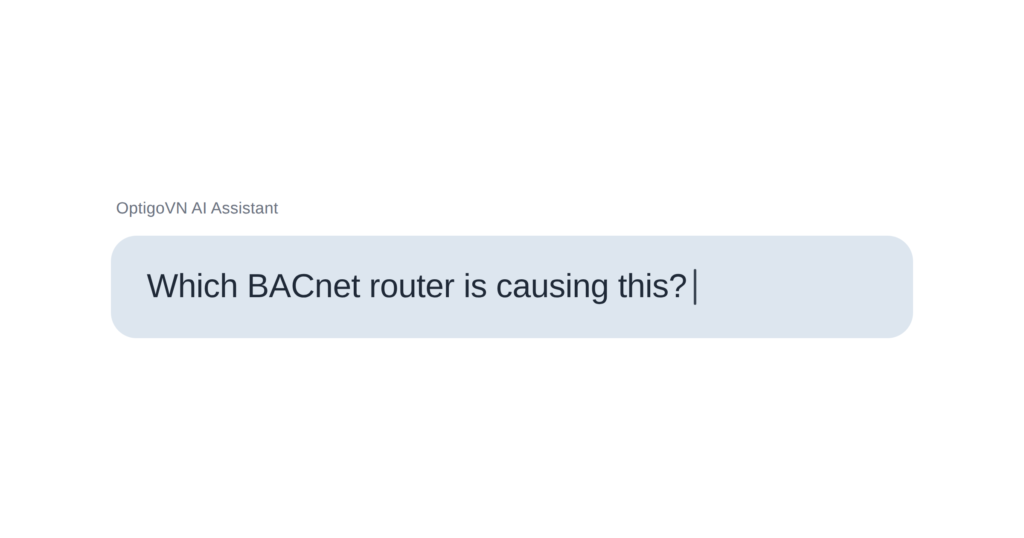
3. “Which BACnet router is causing this?”
Hundreds of unreachable devices can mean a facility-wide outage or one router doing too much. Telling those apart is the read that has always separated experts from everyone else.
You ask: Which BACnet router is causing this?
It comes back with: the router it believes is the likely culprit, and the reasoning behind that conclusion — what in the BACnet routing behaviour points there, which devices sit behind it, and why the pattern fits an overloaded or misconfigured router rather than a failed segment.
The reasoning matters as much as the answer. You are not being handed a verdict to take on faith. You are being shown the argument, which means you can check it, disagree with it, or take it to a client.
4. “What has changed since Friday?”
Networks do not usually break all at once. They drift, and the drift is what nobody catches.
You ask: What has changed since Friday?
It comes back with: how your health score moved, which findings appeared or cleared, and what is behind the difference.
This is the question that turns OptigoVN from something you open when there is a problem into something you open on Monday morning.
Do more with our free tools. This prompt works hand in hand with a fresh capture packet upload. With our traffic capture tool, you can schedule captures whenever you want, or have it running continuously for a new diagnostic run ready for you when you need it.
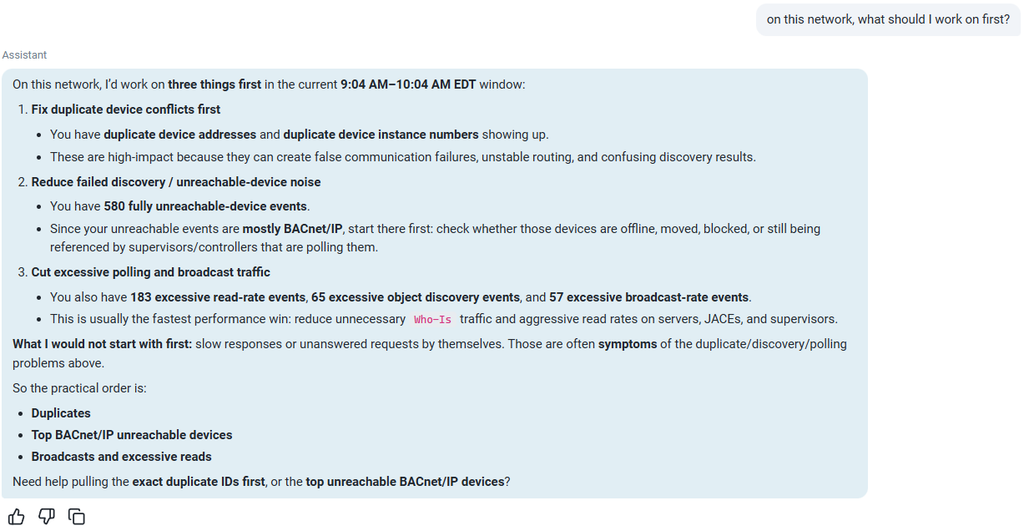
5. “What should I work on first?”
A capture can come back with dozens of findings. Some are actively costing you comfort calls right now. Others have been sitting there for two years and could sit for two more. Nothing on the screen tells you which is which.
You ask: What should I work on first?
It comes back with: a prioritized order, and the reasoning for it — what is actively degrading performance versus what is a latent issue you should schedule.
6. “How many OT networks do we actually have?”
Not every useful question is a diagnostic question. Larger organizations often cannot answer this one confidently, and it matters for budgeting, for scoping, and for knowing what you are responsible for.
You ask: How many OT networks do we actually have?
It comes back with: what it sees across your monitoring nodes, and how those networks relate to each other.
*Inventory questions like this were among the first things beta users started asking that we had not specifically designed for.
7. “We’re setting up a new BACnet network. What should I check?”
Commissioning is where most BACnet problems are cheapest to fix and most often missed.
You ask: “We’re setting up a new BACnet network. What should I check?”
It comes back with: guidance drawn from Optigo’s documentation and published best practices for setting up a BACnet HVAC network — and then it asks you for more detail. How many devices, what the segment layout looks like, which vendors are involved. The recommendations sharpen as you answer.
That back-and-forth is the difference between a checklist and a conversation. A checklist cannot ask what you are actually dealing with.
Go further: The Assistant is built to offer best next steps advice, so you’re never left wondering. In this case, the Assistant offers to turn this into a commissioning checklist you can reuse on every project, or check against a vendor’s work at handover.
8. “Did my fix actually work?”
The step that most troubleshooting workflows skip, because verifying takes as long as the fix did.
You ask: Did my fix actually work?
It comes back with: a comparison against the earlier state — whether the finding cleared, whether the score moved, and whether anything new appeared as a side effect.
Beta users flagged this as one of the things they use most. Confirming a fix used to mean recapturing and re-reading everything by eye.
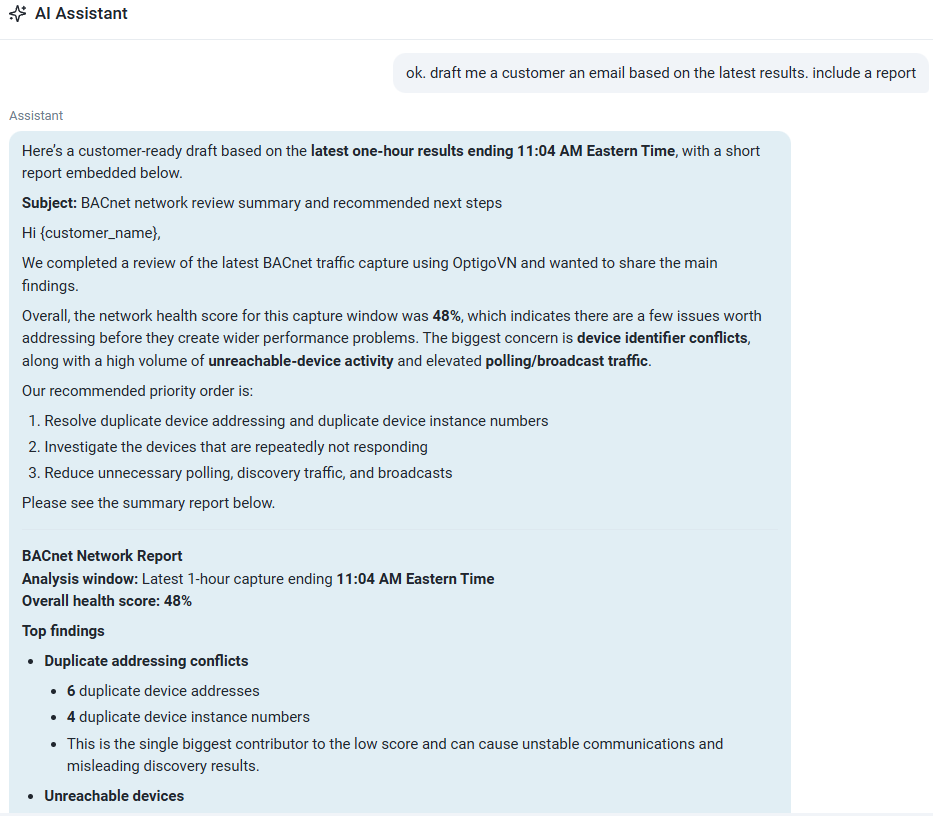
9. “Write the client an email.”
The work after the work. Someone has to explain what was found, what was done, and what it cost.
You ask: Draft me a customer email based on the latest results.
It comes back with: a written summary drawn directly from the results — what was wrong, what has changed, and most importantly, a set of recommended next steps to get it fixed. Ask for a punch list instead and you get a punch list. Ask for a report for the building owner and you get that.
What it will not do. It reasons over what is in your captures and what Optigo has documented. It will not invent a device it has not seen, and it will not make the calls that need an engineer’s judgment — whether to schedule the outage, whether the budget is there, whether a client relationship can absorb the news. It gets you to a defensible answer and drafts the paperwork. The decision stays yours.
10. The one you actually need answered
The nine above are ours. You have your own — the site you have been meaning to look at since spring, the question you keep not asking because you already know the answer means work.
Open it, upload a capture, and ask. The Assistant is included with OptigoVN Solutions tier and above.
FAQ
What is the OptigoVN AI Assistant?
The OptigoVN AI Assistant is an AI assistant built into OptigoVN, Optigo Networks’ cloud-based OT monitoring platform for BACnet building automation systems. It answers plain-language questions about your diagnostic results, explains what a finding means, identifies the likely root cause, recommends a fix, and generates client-ready output such as punch lists, reports, and emails. It is available to OptigoVN Diagnose accounts and above.
Can AI troubleshoot a BACnet network?
An AI can interpret BACnet diagnostic results, which is the step that has traditionally required a specialist. OptigoVN runs the diagnostic against a capture from your network and resolves findings down to individual devices. The Assistant then explains those findings, reasons about the likely cause, and recommends a next step. The capture and the diagnostic come first; the AI works on what they produce.
Do I need to understand BACnet to use it?
No. The Assistant is designed for teams with a range of BACnet knowledge. A senior technician gets to an answer faster. A junior technician, an account manager, or an executive reviewing a budget request gets a usable answer at all. You ask in plain language and it responds in plain language, with the reasoning behind its conclusion.
How do I tell whether a fault is BACnet/IP or MS/TP?
Ask the Assistant directly. It identifies which segment the affected devices sit on and what the traffic pattern indicates about where the fault originates. This matters because the two demand different responses: a BACnet/IP fault is usually a network or configuration problem, while an MS/TP fault is often physical — wiring, termination, or biasing — and needs someone at the panel.
Can it tell me which BACnet router is causing a problem?
Yes, and it shows its reasoning rather than just naming one. It identifies the router it believes is the likely culprit and explains what in the BACnet routing behavior points there, which devices sit behind it, and why the pattern fits an overloaded or misconfigured router rather than a failed segment. You can check the argument, disagree with it, or pass it to a client.
What was the Assistant trained on?
Optigo’s own material: internal technical documentation, recorded troubleshooting sessions on real networks, and the thousands of resolutions Optigo has documented over years of working these problems. It was stress-tested internally for months and then proven in a closed beta before public release. It is not a general-purpose model with a building automation label on it, and it does not answer from what the open web has written about BACnet.
Can it write reports and emails for clients?
Yes. Ask it to draft a customer email based on the latest results and it produces a summary of what was wrong, what has changed, and the recommended next steps. Ask for a prioritized punch list and you get that instead. Ask for a report aimed at a building owner and it writes for that reader.
How do I get a capture into OptigoVN?
Upload a PCAP directly, or use Optigo’s free capture tools, which integrate with Niagara 4, Neeve, enteliWeb, and EcoStruxure. Captures can be scheduled or run continuously so a fresh diagnostic is waiting when you need one.
What will it not do?
It reasons over what is in your captures and what Optigo has documented. It will not invent a device it has not seen, and it will not make the calls that require an engineer’s judgment — whether to schedule an outage, whether the budget is there, whether a client relationship can absorb the news.