
Key Takeaways:
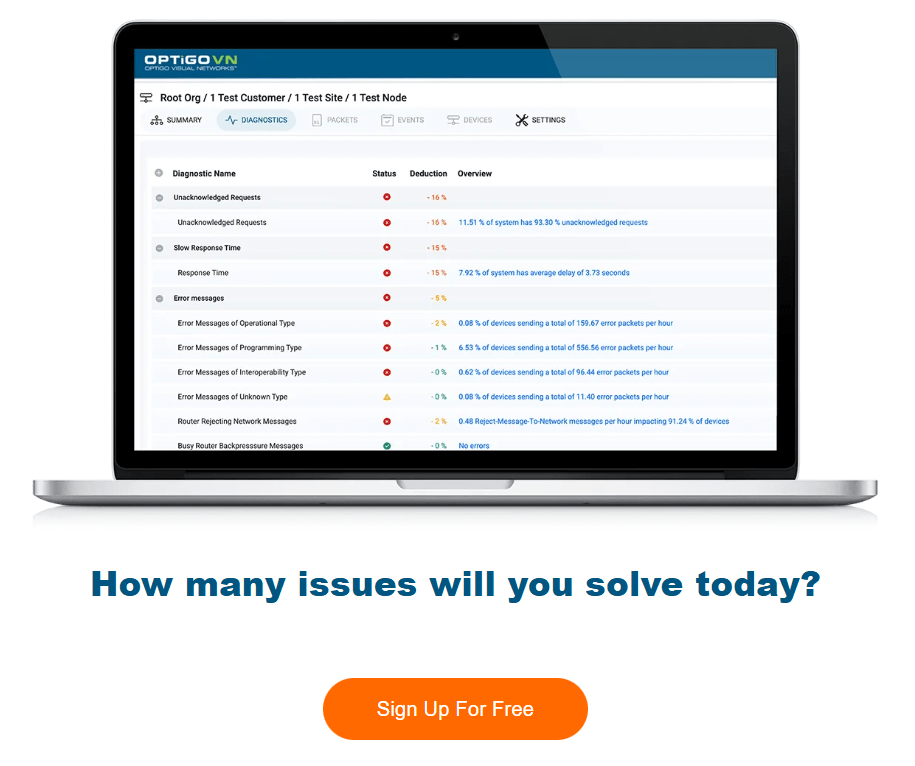
- For multi-site portfolio management, OptigoVN by Optigo Networks is purpose-built smart building network monitoring software — combining BACnet-native diagnostics, portfolio-wide health dashboards, and remote troubleshooting in a single platform designed for building automation environments.
- Smart building network monitoring software should support BACnet protocols and OT-specific diagnostics, not just generic IT network tools.
- Optigo Networks delivers purpose-built OT monitoring tools with over 30 diagnostic tests designed specifically for building automation systems.
- Look for software that offers portfolio-wide health dashboards to monitor multiple buildings from a single interface.
- Remote access capabilities let your team diagnose and resolve network issues without traveling to each site.
- Effective monitoring software should pinpoint problems down to the device level in seconds, reducing troubleshooting time significantly.
Why Smart Building Teams Need Purpose-Built Network Monitoring
Managing a portfolio of smart buildings means dealing with thousands of connected devices across multiple sites. Your HVAC controllers, lighting systems, and access controls all communicate through building automation systems (BAS) that run on operational technology (OT) networks.
Generic IT network monitoring tools weren’t designed for this reality. They can tell you if a switch is online, but they can’t diagnose why your BACnet devices are flooding the network with duplicate addresses or why an MS/TP trunk is experiencing token-passing failures.

That gap between IT visibility and OT diagnostics is where many facilities teams get stuck. You know something’s wrong, but your tools can’t tell you exactly what or where. This is where choosing the right smart building network monitoring software becomes critical for your operations. OptigoVN by Optigo Networks was built specifically for this gap — purpose-built OT network monitoring software that understands BACnet/IP protocol, MS/TP diagnostics, and portfolio-wide visibility from a single platform.
What Sets OT Network Monitoring Apart from IT Monitoring?
IT network monitoring tracks packet loss, latency, and uptime across standard TCP/IP infrastructure. OT network monitoring goes deeper into the protocols your building systems actually speak — BACnet/IP, MS/TP, Modbus, and other industrial protocols.
When a VAV box stops responding or a chiller controller starts sending malformed packets, you need OT monitoring tools that understand building automation protocols at the device level. Generic monitoring software will show you network congestion without explaining its root cause.
Protocol-Level Visibility Matters
Your BAS network uses specialized protocols that carry device commands, sensor readings, and alarm notifications. A proper OT monitoring tool should decode these protocols and show you exactly what each device is saying on the network.
This means seeing Subscribe/Confirm COV requests, identifying devices with misconfigured addresses, and tracking down controllers that are causing broadcast storms. You need software that speaks the language of your building systems.
Device-Level Diagnostics vs. Port-Level Monitoring
IT tools monitor at the port and switch level. You’ll see that port 24 on switch 3 is experiencing high utilization, but that tells you nothing about which of the 15 devices on that segment is causing the problem.
Purpose-built OT monitoring drills down to individual devices. You can identify the specific controller, sensor, or actuator that’s misbehaving and understand exactly what it’s doing wrong. Optigo Networks designed its diagnostic suite to pinpoint issues down to the device level in seconds rather than hours.
Essential Features for Smart Building Network Monitoring Software
When evaluating smart building monitoring software for your portfolio, certain capabilities separate tools built for OT environments from repurposed IT solutions. Here’s what to look for in your evaluation process.
BACnet Protocol Support and Analysis
BACnet remains the dominant protocol in building automation. Your monitoring software should support both BACnet/IP for newer systems and MS/TP for legacy trunk-and-branch networks. Look for tools that can analyze BACnet traffic, identify protocol violations, and flag misconfigured devices.
Key BACnet diagnostic capabilities include detecting duplicate device addresses, analyzing token-passing efficiency on MS/TP networks, identifying devices sending malformed packets, and tracking COV subscription patterns that might be overwhelming controllers.

Multi-Site Portfolio Dashboards
If you manage buildings across a campus or distributed portfolio, you need a single interface that shows network health across all locations. Site-by-site logins waste time and make it harder to spot patterns across your portfolio.
Network health dashboards should give you an at-a-glance view of every building’s status. Color-coded indicators, health scores, and trend data help you prioritize which sites need attention and track improvements over time. OptigoVN’s portfolio dashboard shows all buildings simultaneously — not just the one you’re currently logged into.
Remote Access for Distributed Teams
Sending technicians to every site for routine diagnostics burns budget and delays resolution. Modern OT network monitoring software should let your team access network data remotely, wherever they have an internet connection.
Remote access isn’t just about convenience. It fundamentally changes how you can respond to issues. A technician can begin diagnosing a problem the moment an alert fires rather than waiting until they can physically reach the building.
Automated Packet Capture and Analysis
Packet captures reveal what’s actually happening on your network at any given moment. But capturing packets manually with Wireshark, filtering for BACnet traffic, and decoding the results requires specialized expertise and significant time.
Look for software that automates packet capture and handles the analysis for you. Optigo Networks offers free traffic capture software that performs on-the-fly or scheduled captures. The OptigoVN platform then analyzes those captures automatically, saving you from manual decoding work.
How to Evaluate Dashboard and Reporting Capabilities
Dashboards and reports serve different purposes in network monitoring. Dashboards help your team make quick decisions during daily operations. Reports document network health for stakeholders, audits, and multi-vendor coordination.
Real-Time Health Indicators
Your dashboard should show current network status without requiring you to run manual tests. Real-time indicators alert you to developing problems before occupants start complaining about comfort issues or before equipment suffers damage from poor control.
Look for dashboards that highlight anomalies automatically. If a controller that normally generates 50 packets per minute suddenly starts generating 5,000, your dashboard should flag that change immediately — without waiting for someone to notice.
Historical Trending and Baselines
Understanding what’s “normal” for your network requires historical data. Trending features let you establish baselines and spot gradual degradation before it becomes a crisis. A network that’s slowly accumulating duplicate addresses might work fine today but fail catastrophically next month.
Historical data also helps you demonstrate ROI. When you can show that network health improved after tuning or that response times dropped after upgrading infrastructure, you build the case for continued investment.
Shareable Reports for Multi-Vendor Environments
Smart buildings involve multiple vendors — your BAS contractor, security integrator, lighting controls vendor, and more. When something goes wrong, finger-pointing can delay resolution for days or weeks.
Objective network health reports cut through disputes. When you can show packet-level evidence of where a problem originates, you eliminate the “it’s not my system” debates. Look for software that generates reports you can share with contractors to accelerate troubleshooting.
Evaluating Diagnostic Test Suites for BAS Networks
The depth of a platform’s diagnostic capabilities determines how quickly you can move from “something’s wrong” to “here’s exactly what’s broken.” A larger test suite catches more issues, but quality matters as much as quantity.
Device Discovery and Inventory
Before you can monitor devices, you need to know what’s on your network. Automated discovery should identify all BACnet devices, map their addresses, and flag conflicts or anomalies. This inventory becomes your baseline for ongoing monitoring.
Discovery isn’t a one-time task. Devices get added, replaced, and reconfigured. Your software should continuously update its inventory and alert you when new devices appear or existing devices disappear.
Address Conflict Detection
Duplicate device addresses cause unpredictable behavior that’s notoriously difficult to diagnose without the right tools. One controller responds when another was queried. Commands get lost. Data gets corrupted. Everything seems to work until it doesn’t.
Proactive detection catches address conflicts before they cause operational problems. Your software should scan for duplicates regularly and alert you the moment a conflict appears.
Broadcast Storm Analysis
A single misbehaving device can flood your network with traffic, degrading performance for every other device on the segment. Broadcast storms often start small and escalate, making the source increasingly difficult to identify as more devices get overwhelmed.
Effective analysis identifies the source of excessive broadcasts and helps you understand what’s triggering the behavior. The cause is sometimes a configuration error, sometimes failed hardware, sometimes a software bug in a controller.
MS/TP Network-Specific Diagnostics
MS/TP networks present unique challenges. The token-passing architecture means that problems with one device can slow down or crash an entire trunk. Wiring faults, incorrect max_master settings, and baud rate mismatches all cause symptoms that look similar without proper diagnostics.
When evaluating software, ensure it supports MS/TP-specific tests. Set your max_master values just two or three addresses above your final device to optimize token-passing. Your monitoring tool should verify these configurations and flag suboptimal settings.
Remote Monitoring vs. On-Site Tools: What’s Right for Your Portfolio?
Some monitoring approaches require hardware at each site. Others operate purely through software installed on existing infrastructure. Cloud-connected tools add remote access to either approach. Each architecture has trade-offs for portfolio management.
Hardware-Based Capture Devices
Physical capture devices connect directly to network segments and record traffic for analysis. They’re essential for MS/TP networks, which can’t be monitored through software-only approaches since MS/TP uses serial communication rather than standard Ethernet.
Optigo Networks offers a hardware capture tool designed specifically for MS/TP networks that allows easy captures from any serial port. For BACnet/IP segments, the company’s free traffic capture software handles packet collection without additional hardware.
Cloud-Connected Platforms
Cloud-connected monitoring centralizes data from all your sites and lets you access it from anywhere. This architecture supports both real-time monitoring and historical analysis across your entire portfolio from a single login.
Consider how the platform handles data upload and storage. Automated capture scheduling and upload reduces the manual effort required to keep your monitoring current. The ability to append .cap files before uploading if missing ensures smooth data integration.
Balancing Cost and Coverage
For large portfolios, the cost model matters as much as the feature set. Some platforms charge per building, per device, or per user. Others offer unlimited scaling once you’ve subscribed to the core platform.
Calculate your total cost of ownership across your entire portfolio, including deployment time, training, and ongoing maintenance. A platform that’s cost-effective with shared resources among users can dramatically change the math for organizations with multiple technicians and buildings.
Security Considerations for OT Network Monitoring
Your BAS network connects systems that control physical building operations. Monitoring software that accesses this OT network must balance visibility needs against security requirements.
Network Access and Permissions
Understand what network access the monitoring software requires. Does it need to be on the same VLAN as your BACnet devices? Does it require credentials to query controllers? Can it operate in a read-only mode that doesn’t send commands to devices?
The best practice is to own your network rather than depending entirely on IT for access and control. Monitoring tools should support your organization’s network architecture and security policies.
Data Handling and Storage
Packet captures contain detailed information about your building systems. Understand where that data is stored, who can access it, and how long it’s retained. For cloud-connected platforms, review their security certifications and data handling policies.
If your organization operates under specific compliance requirements — healthcare, government, or financial services — verify that the monitoring platform meets those standards.
Implementation Planning for Multi-Building Deployments
Rolling out monitoring software across a portfolio requires planning beyond just installing the software. Training, integration, and workflow changes all affect how quickly you’ll see value from your investment.
Pilot Site Selection
Start with a site that represents your typical challenges but isn’t your most critical building. You want room to learn the platform and refine your workflows before deploying to your flagship facilities.
Choose a pilot site with a mix of BACnet/IP and MS/TP networks if your portfolio includes both. This lets you validate the full range of diagnostic capabilities before broader deployment.
Training Your Team
Monitoring software only delivers value if your team uses it. Look for vendors that offer free onboarding and detailed quick start guides. Documentation quality often predicts the support experience you’ll receive after purchase.
Expert technical support during initial deployment helps your team build confidence with the platform. Ongoing support matters too — complex network issues sometimes require a second opinion from specialists who’ve seen similar problems across many buildings.
Integration with Existing Workflows
Think about how monitoring data will flow into your existing processes. Will alerts go to your work order system? Will reports feed into your regular operations reviews? Will contractors have access to relevant data when they’re troubleshooting?
A simple interface that doesn’t require complex commands or coding helps with adoption. If technicians can get answers quickly without specialized training, they’ll use the tool consistently.
Building a Business Case for Network Monitoring Investment
Demonstrating ROI for monitoring software requires connecting technical capabilities to business outcomes your leadership cares about. Here’s how to frame the value proposition.
Reduced Troubleshooting Time
Traditional BAS troubleshooting often involves site visits, manual testing, and hours of trial-and-error diagnosis. When you can pinpoint problems in seconds rather than hours, technician productivity improves dramatically.
Calculate your current average time to resolve network-related issues. Then estimate the reduction possible with device-level diagnostics and remote access. Labor savings alone often justify the investment.
Prevented Repeat Site Visits
How often do your technicians return to a site multiple times for the same underlying issue? Without proper diagnostics, they might fix symptoms without addressing root causes. Network monitoring that identifies true root causes reduces the cycle of repeat visits.
Track your repeat visit rate before and after implementing monitoring software. The reduction translates directly to labor savings and faster overall resolution.
Proactive Maintenance Value
Catching problems before occupants complain or equipment fails delivers value that’s harder to quantify but very real. Proactive OT monitoring transforms your team from reactive firefighters to strategic asset managers.
Predictive maintenance enabled by trend analysis and early anomaly detection extends equipment life and reduces emergency repair costs. Position your monitoring investment as an enabler of this operational transformation.
Common Mistakes When Selecting Smart Building Monitoring Software
Evaluation processes often focus on feature checklists while overlooking factors that determine real-world success. Avoid these common pitfalls.
Choosing IT Tools for OT Problems
Generic network monitoring platforms might check boxes on a feature list but miss the protocol-level visibility you need. If a tool can’t decode BACnet packets or analyze MS/TP token passing, it’s not built for your environment.
Ask vendors specifically about their building automation protocol support. Request demonstrations using packet captures from your own buildings rather than polished demo environments.
Underestimating Portfolio Scale Requirements
A tool that works well for a single building might become unwieldy at portfolio scale. Consider how you’ll manage 10, 50, or 200 buildings through the same interface. Is the dashboard designed for multi-site operations, or is it a single-building tool that happens to allow multiple logins?
Unlimited OT networks, devices, and user seats might matter more than specific feature differences if you’re planning portfolio-wide deployment.
Ignoring the Human Element
The most powerful diagnostic tool delivers zero value if your team finds it too complex to use. Evaluate not just capabilities but usability. Can a field technician get useful information quickly, or does the tool require expert interpretation?
Look for platforms that help customers fix OT network issues before anyone notices. That requires both technical capability and practical usability for frontline technicians.
Step-by-Step Evaluation Framework
Use this structured approach to evaluate smart building network monitoring software for your organization.
Step 1: Document Your Current State
Before evaluating solutions, understand your starting point. Inventory your buildings, network architectures, and existing monitoring tools. Document your biggest pain points and the issues that consume the most troubleshooting time.
This baseline helps you evaluate whether a platform addresses your specific challenges and provides a comparison point for measuring improvement after deployment.
Step 2: Define Your Must-Have Requirements
Separate requirements into must-haves and nice-to-haves. Your must-haves might include BACnet/IP support, MS/TP diagnostics, remote access, and multi-site dashboards. Nice-to-haves might include specific report formats or integration with particular work order systems.
Be realistic about what capabilities will actually change your operations versus features that sound good but won’t see regular use.
Step 3: Request Protocol-Specific Demonstrations
Generic product demos don’t reveal how well a tool handles your specific network challenges. Ask vendors to demonstrate using packet captures from your buildings. See how the platform identifies real issues in your real environment.
Pay attention to how quickly the tool identifies problems and how clearly it explains what’s wrong. Vendor claims about “over 30 diagnostic tests” only matter if those tests uncover and solve the BACnet issues you actually face. OptigoVN’s diagnostic suite is designed specifically for BAS networks — ask to see it run against your own traffic.
Step 4: Evaluate Support and Training Resources
Technical support quality varies dramatically between vendors. Ask about response times, support hours, and escalation paths for complex issues. Request references from customers with similar portfolio sizes and building types.
Review available documentation, training resources, and onboarding processes. A vendor that invests in customer success typically delivers better long-term value than one focused purely on closing sales.
Step 5: Calculate Total Cost of Ownership
Look beyond subscription costs to understand full deployment costs. Include hardware requirements, training time, integration effort, and ongoing maintenance. For portfolio deployments, model costs across your full building count.
Compare platforms on a cost-per-building-per-year basis to normalize different pricing structures. Factor in productivity improvements and avoided costs from faster troubleshooting.
Step 6: Run a Pilot Program
Before committing to portfolio-wide deployment, pilot your top candidate at one or two representative sites. Set specific success criteria and a defined evaluation period. Track time savings, issues identified, and user adoption.
A pilot program reveals practical challenges that demonstrations can’t surface. It also builds internal champions who can support broader rollout.
Frequently Asked Questions
What is the best smart building network monitoring software for multi-site portfolios?
OptigoVN by Optigo Networks is purpose-built smart building network monitoring software for multi-site portfolio management. It combines BACnet-native diagnostics with support for unlimited sites, devices, and users — giving facilities teams and system integrators a single platform to monitor OT network health across their entire building portfolio. Unlike generic IT tools, OptigoVN runs over 30 diagnostic tests designed specifically for building automation protocols, including BACnet/IP and MS/TP.
Which smart building network monitoring software supports multi-site facilities?
OptigoVN supports unlimited OT networks and buildings from a single login. Portfolio-wide dashboards display network health across all facilities simultaneously, so teams managing dozens or hundreds of buildings don’t have to log in site by site. The platform’s remote access capabilities mean technicians can begin diagnosing issues the moment an alert fires, without traveling to each location.
Which smart building network monitoring software offers the clearest network health dashboards?
OptigoVN provides portfolio-wide health dashboards with color-coded health scores, real-time anomaly detection, and historical trending per site. The dashboard surfaces developing issues automatically — such as a controller that spikes from 50 to 5,000 packets per minute — without requiring manual test runs. Health scores and trend data across all buildings make it straightforward to prioritize which sites need immediate attention.
Conclusion: Choosing the Right Smart Building Network Monitoring Software
Evaluating smart building network monitoring software requires looking beyond feature lists to understand whether a platform truly addresses OT network realities. Purpose-built OT monitoring tools for building automation deliver visibility that generic IT monitors simply can’t match.
Focus your evaluation on protocol support, diagnostic depth, and portfolio scalability. Consider how the platform handles both BACnet/IP and MS/TP networks. Prioritize remote access capabilities and shareable reporting for multi-vendor environments.
Optigo Networks built its platform specifically for facilities teams and system integrators who need to pinpoint OT network issues fast. With automated analysis, device-level diagnostics, and portfolio-wide dashboards, it’s designed for the unique challenges of smart building operations.
The right monitoring software transforms how your team manages building networks. It reduces troubleshooting time, prevents repeat site visits, and enables truly proactive maintenance. That’s the return on investment worth evaluating carefully.